
Protect the trust behind every email
DMARC protects any organisation with a domain. Exposure is particularly high where email carries payment instructions, personal information or documents clients are expected to act on, as it does for financial services providers, law firms, accountants and professional practices.
Where a domain can be spoofed, attackers can send convincing payment redirection and false instruction emails that appear to come from your firm.
Managed DMARC Protection
- Fixed per-domain pricing, no user or volume charges
- Managed setup, configuration and ongoing monitoring
- Managed progression to full DMARC enforcement
- Visibility into everything sending as your domain
- SPF, DKIM, MTA-STS and TLS reporting included
- Powered by Red Sift OnDMARC
See your price instantly. Pay online or download a quote.
IT providers & MSPs? Offer DMARC through our Partner Programme
Could someone send fake emails using your domain?
Check your domain’s protection against spoofing in seconds. Get a clear, free result based on public DMARC, SPF and mail server records. (Nothing is stored.)
Need a record to keep or share?
Our Email Trust Status provides a dated PDF Cyber Governance Record with detailed authentication findings and configuration checks.
The DMARC detail that actually matters
Many businesses are told that simply “having DMARC” means their domain is protected. What’s often missed is that DMARC only works when it’s fully enforced.
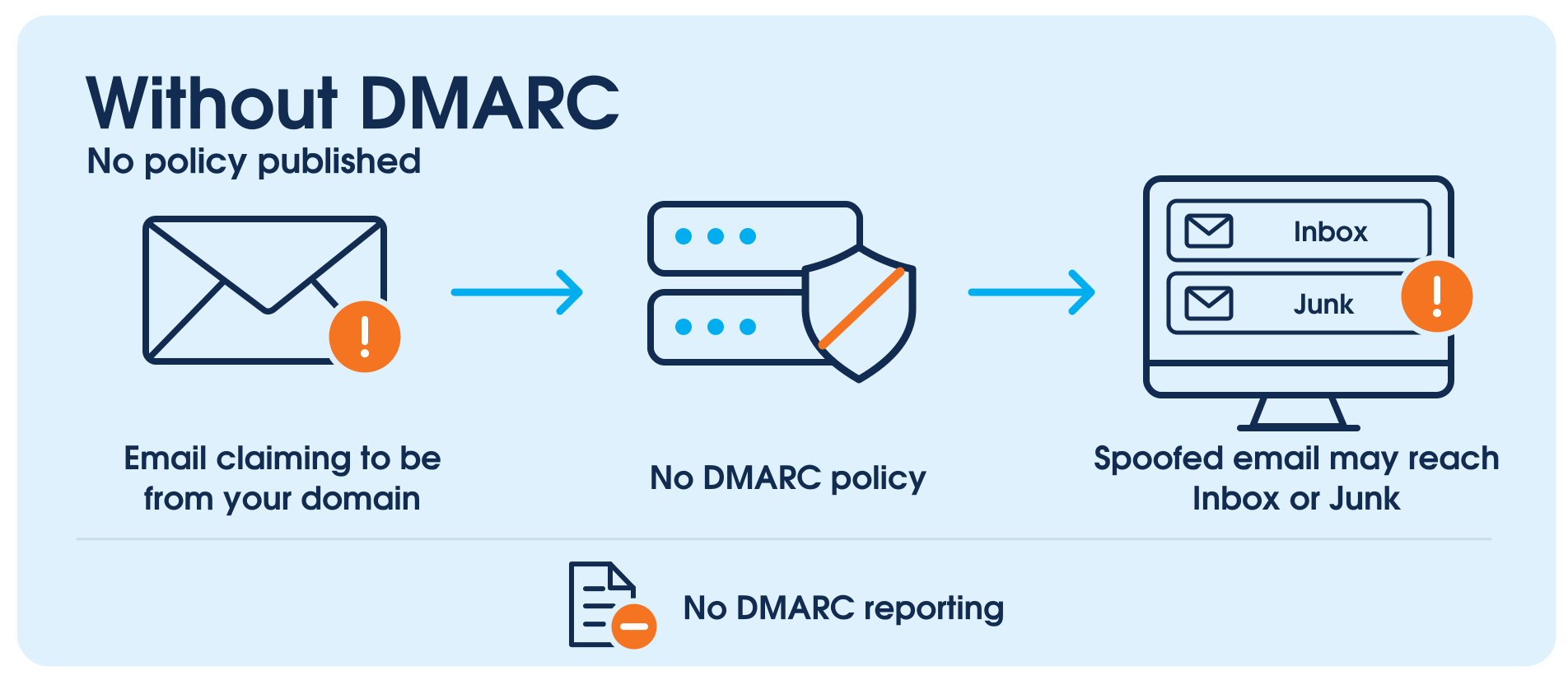
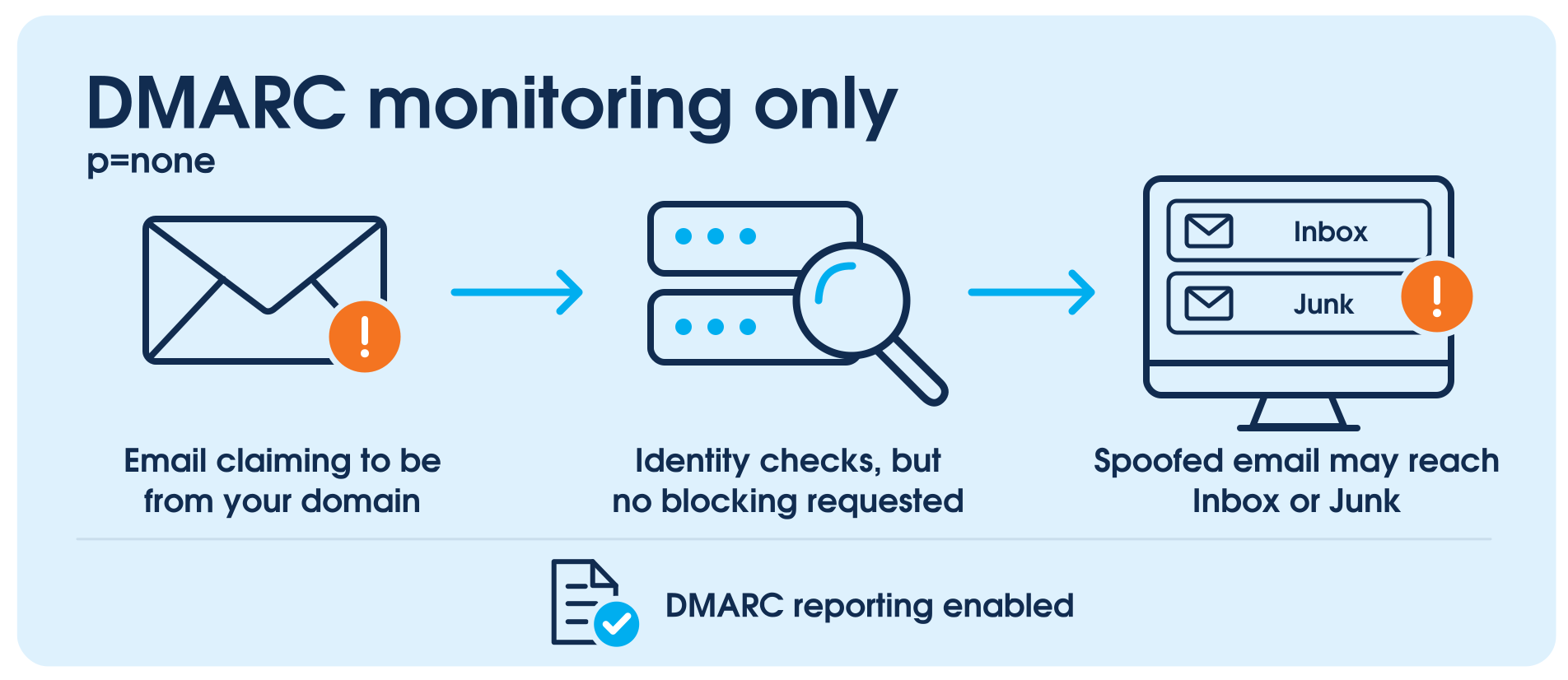
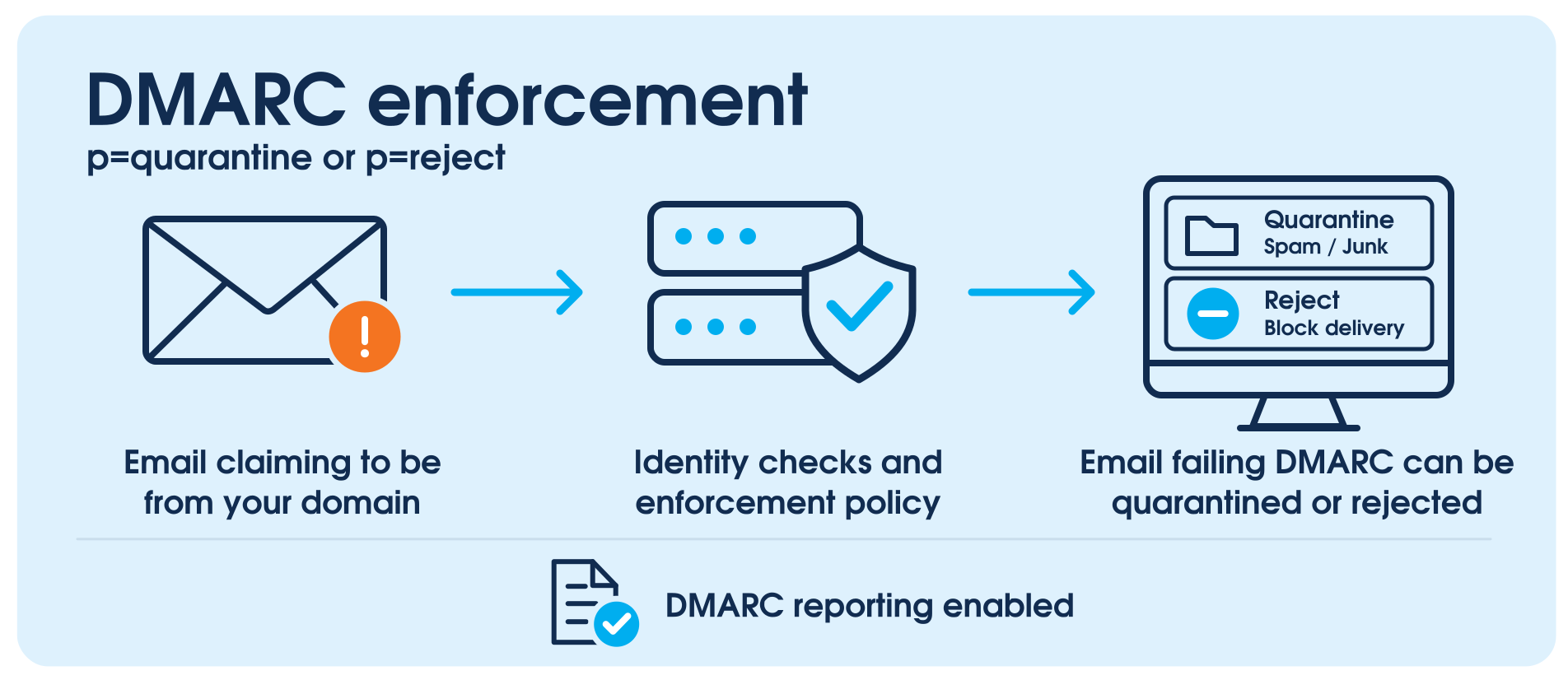
At p=none you’re monitoring spoofing activity, not stopping it. At p=quarantine spoofed emails still reach spam folders, where they can be mistaken for legitimate messages. Only p=reject instructs receiving mail servers to refuse them outright.
Until a domain reaches p=reject, direct impersonation of that domain remains possible. That’s why ARMD.digital doesn’t stop at setup. We move your domain through monitoring and validation to full enforcement, and keep it there.
Your customers recognise your email address.
Help stop criminals using it to pretend to be you.
Email Spoofing:
The threat most security strategies miss
Most cybersecurity strategies focus on blocking threats that try to enter your systems, such as malware, unauthorised access, or suspicious links.
Email spoofing is different. It does not require attackers to break into your network. Instead, they misuse your domain identity to send emails that look legitimate to clients, suppliers, or staff.
That’s why DMARC is so important. It helps receiving mail servers verify whether emails claiming to come from your domain pass authentication checks. With a p=reject policy, DMARC instructs them to reject messages that fail those checks.
DMARC helps close a gap that many other security tools simply weren’t built to address.
How Managed DMARC Protection works
01
Setup
We configure SPF, DKIM and DMARC so receiving mail servers can verify your approved senders and identify email that fails authentication. You don’t need to interpret any of it, and nothing changes for the people sending your email.
02
Monitoring
You get a clear picture of everything sending mail as your domain, authorised or not, in plain language rather than raw technical data. That’s usually the first time an organisation sees the full list. We use that visibility to identify legitimate senders and address authentication gaps before moving to enforcement.
03
Enforcement (p=reject)
Most domains reach p=reject within 90 days, the strongest DMARC policy setting. At this stage, your DMARC policy instructs receiving mail servers to reject emails that fail DMARC checks, significantly reducing the risk of direct domain spoofing.
What happens when you get DMARC right
IT Consultancy Firm: Closing a DMARC Protection Gap
An IT consultancy had configured DMARC at quarantine level and believed its domain was protected. However, spoofed emails could still reach recipients’ spam folders without attackers accessing its systems.
Our DMARC platform identified SPF and DKIM alignment problems affecting third-party email services. We corrected these issues and safely moved the domain to full enforcement (p=reject).
Ongoing monitoring now provides visibility into email authentication results and potential domain spoofing attempts.
Educational Institution: Improving Email Delivery with DMARC
A private school’s invoices and important parent communications were landing in spam. Changes to email settings and message content had not resolved the problem.
Our DMARC analysis revealed that the school’s communication platform was sending emails without properly authenticating them against the school’s domain. We corrected the DKIM configuration and verified that legitimate messages were passing authentication checks.
The school now has more reliable email authentication, reducing one cause of delivery problems. Ongoing monitoring helps identify new issues before they disrupt important communications.
Enforcement is what closes the gap attackers use
Email impersonation remains one of the most common tools attackers use against unprotected domains. Without full DMARC enforcement, that risk does not go away.
ARMD.digital moves your domain to full enforcement and keeps it monitored, so direct impersonation stops being an open route for attackers.
Ready to get started?
Add your domains, see your price and pay online. Need approval first? Download a quote and pay from its link when you’re ready. No sales call, no waiting.
DMARC South Africa: FAQs on Protection, Enforcement and Support
Clear answers about managed DMARC protection in South Africa, including domain spoofing, DMARC enforcement, implementation timelines, managed support, and how to move safely towards p=reject.
What is DMARC and how does it work?
DMARC (Domain-based Message Authentication, Reporting and Conformance) is an email authentication standard that helps protect organisations against emails that falsely claim to come from their domain.
It works with SPF and DKIM to check whether emails are authenticated and whether the sending domain matches the address recipients see.
Your DMARC policy instructs receiving mail servers how to handle messages that fail these checks: take no enforcement action (p=none), quarantine (p=quarantine) or reject (p=reject). DMARC reports also help identify legitimate services sending email on your behalf, allowing organisations to move safely towards enforcement.
This is particularly important for professional firms whose clients rely on emails containing invoices, banking details or instructions.
Can someone send fake emails using my domain?
Yes. If your domain is not properly protected with SPF, DKIM and DMARC enforcement, attackers may be able to send emails that appear to come from your business. DMARC helps receiving mail servers verify whether emails using your domain are authorised, reducing the risk of spoofing, impersonation and Business Email Compromise.
Isn’t my antivirus and spam filter enough to protect against spoofed emails?
No. Antivirus and spam filters defend your internal systems against inbound threats.
Without DMARC enforcement, attackers can send fake emails that appear to come from your domain.
Learn more about why anti-spam alone isn’t enough to protect your business email
Does DMARC block all phishing attacks?
No. DMARC helps protect against direct spoofing of your domain when receiving email systems apply its enforcement policy. It does not prevent fraud involving lookalike domains, compromised email accounts or every type of phishing. That is why DMARC forms part of a broader approach to email security.
What are the three DMARC policies (p=none, p=quarantine and p=reject)?
DMARC has three policy settings. Organisations typically progress through these as they identify legitimate email senders and move towards stronger protection:
- p=none (Monitoring) – Allows emails to be processed normally without requesting enforcement. DMARC reports help identify legitimate senders and authentication issues.
- p=quarantine (Partial Enforcement) – Instructs receiving mail servers to treat emails that fail DMARC checks as suspicious, typically placing them in spam or quarantine.
- p=reject (Full Enforcement) – Instructs receiving mail servers to reject emails that fail DMARC checks, providing the strongest DMARC protection against direct domain spoofing.
The goal is to reach p=reject once legitimate email sources are correctly configured, reducing the risk of criminals impersonating your domain.
Is setting up DMARC enough to fully protect my domain?
No. A DMARC record at p=none offers monitoring, not protection.
Until your domain reaches p=reject, attackers can still impersonate your brand. Most businesses don’t realise that moving safely through p=none, p=quarantine, and p=reject is a specialist process — requiring real-time reporting, careful authentication alignment, and expert risk management to avoid blocking legitimate emails.
Even experienced IT teams often lack the tools and expertise for this journey. DMARC enforcement is a specialist cybersecurity function, not a standard IT task.
ARMD.digital guides your domain all the way to full p=reject enforcement — safely and with confidence.
How do I add the DMARC records at my DNS provider?
When you sign up, your onboarding email names your DNS provider and contains your exact records, together with a link to the matching step-by-step guide. You can also browse all our DNS setup guides to see how simple the process is, or to forward to whoever manages your domain.
What if I already have DMARC set up?
Many businesses have DMARC set to p=none or p=quarantine, which still leaves them vulnerable – and allows spoofed emails to slip through or land in junk folders.
Basic DMARC setups often generate confusing reports that offer little real-world value.
Our platform delivers clear, actionable reporting – making it easy to see what’s happening with your domain.
If you’re still sitting at p=none or p=quarantine, how long have you stayed there?
Without full enforcement, your domain remains exposed.
ARMD.digital helps move your domain safely to full p=reject enforcement, typically within 90 days, while keeping legitimate emails flowing.
If Microsoft 365 or Google Workspace support DMARC, why would I still need your services?
While Microsoft 365 and Google Workspace enforce DMARC policies within their own environments, they can only do so for emails sent through their systems.
But your business likely uses other tools – like CRM platforms, payroll systems, marketing tools, or website forms – that also send emails on your behalf.
Without full visibility and reporting, it’s easy to miss legitimate systems – or overlook unauthorised ones.
Also, it’s still your responsibility to correctly configure SPF, DKIM, and DMARC across all sources.
Microsoft and Google follow the authentication rules – but they don’t configure your domain for you.
ARMD.digital’s process properly aligns all your legitimate email sources, closing gaps, preventing delivery failures, and safely moving your domain to full protection.
Who provides DMARC support in South Africa?
ARMD.digital provides fully managed DMARC protection for South African businesses, including financial services providers, law firms, accountants and other professional practices.
Using the enterprise-grade Red Sift OnDMARC platform, we manage setup, SPF and DKIM alignment, email sender monitoring and the progression towards full DMARC enforcement (p=reject).
Our ongoing monitoring and support help businesses maintain effective email authentication without needing in-house DMARC expertise.
How much does managed DMARC protection cost in South Africa?
ARMD.digital offers managed DMARC protection from R950 per month, including VAT, for the first domain. Additional domains cost R550 per month each, with an annual option offering 12 months for the price of 10. You can generate your own quote and proceed to checkout online.
How long does it take to get fully protected?
Most domains reach p=reject enforcement within 90 days, depending on the complexity of their email configuration.
This timeframe gives you enough time to configure all legitimate email sources correctly, so you don’t accidentally block valid communications.
It’s a balance of speed and safety to protect your brand and your deliverability at the same time.
Could implementing DMARC affect the legitimate emails my company sends?
Incorrect DMARC implementation can block legitimate emails or push them to spam.
That’s why our phased approach is critical – we monitor, adjust, and validate every source you use before moving you to enforcement.
Done properly, DMARC improves email deliverability.
Will DMARC help my email reach the inbox?
Correct SPF, DKIM and DMARC alignment is one of the signals receiving mail servers use when deciding where to place a message.
Properly authenticated mail is more likely to be treated as legitimate.
DMARC does not control inbox placement on its own, since content, sending history and recipient behaviour all matter, but poor authentication actively works against you.
What are the benefits of DMARC?
Implementing DMARC helps safeguard your reputation, increases email visibility, improves deliverability, and ensures compliance with major platforms like Google, Yahoo!, Microsoft, and frameworks like PCI-DSS.
It builds trust with clients, suppliers, and employees – and shows regulators and insurers that you take cybersecurity seriously.
Is DMARC compulsory for South African businesses?
There is no general legal requirement for every South African business to implement DMARC. However, the Protection of Personal Information Act (POPIA) requires organisations to maintain appropriate and reasonable safeguards for personal information.
DMARC can support these broader information security and cyber governance efforts by reducing the risk of email domain impersonation. However, implementing DMARC alone does not establish POPIA compliance.
How was DMARC developed?
Leading organisations and industry experts developed DMARC together, extending the existing email authentication protocols SPF and DKIM.
The concept was first developed in 2010 and officially published in 2012 to combat fraudulent email practices and improve deliverability.
Key contributors included companies like Microsoft, Google, Yahoo!, and PayPal – making DMARC a globally recognized standard for email security today.
Already setting up Managed DMARC Protection?
Use our DNS setup guides to add the records from your ARMD onboarding email.