
Last updated: 25 November 2026
In February 2024, Google and Yahoo introduced stricter email authentication requirements to reduce spam, phishing and email impersonation.
Although these requirements particularly affect businesses that send large volumes of email, they highlight an important issue for every organisation with its own email domain: can receiving email systems distinguish legitimate emails from those impersonating your business?
What are Google and Yahoo’s email authentication requirements?
Google and Yahoo require senders to authenticate their emails. For bulk senders, the requirements include three important email authentication protocols:
- SPF (Sender Policy Framework): Identifies which mail servers are authorised to send email for a domain.
- DKIM (DomainKeys Identified Mail): Uses a digital signature to help verify the authenticity and integrity of an email.
- DMARC (Domain-based Message Authentication, Reporting and Conformance): Builds on SPF and DKIM to help verify that an email is authorised to use the domain shown in its From address.
Google classifies senders who send approximately 5,000 or more messages per day to personal Gmail accounts as bulk senders. Yahoo applies its bulk sender requirements to organisations sending significant volumes of email without specifying a fixed numerical threshold.
Both providers also have requirements relating to spam complaints, unsubscribe mechanisms and other sending practices.
Does meeting the DMARC requirements mean your domain is protected?
Not necessarily.
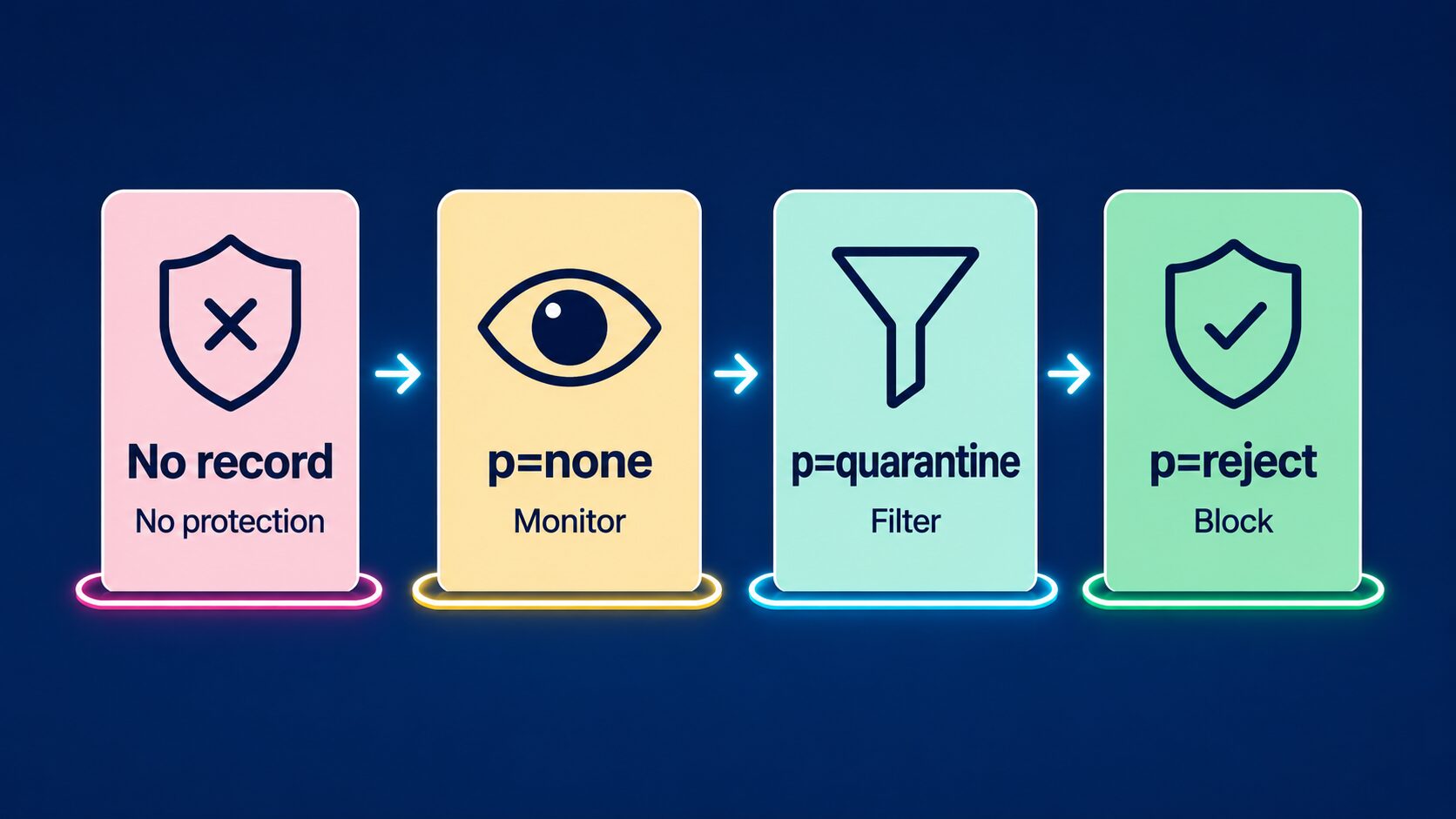
Google and Yahoo accept a DMARC policy of p=none as the minimum policy requirement for bulk senders. However, this does not request that receiving email systems block emails that fail DMARC checks.
There are three DMARC policy settings:
- p=none: Allows monitoring and reporting without requesting that failed messages be blocked.
- p=quarantine: Requests that receiving email systems treat failed messages as suspicious.
- p=reject: Requests that receiving email systems reject failed messages.
Meeting the minimum sender requirements and protecting your domain against spoofing are therefore two different objectives.
Businesses should aim to progress safely towards full DMARC enforcement while maintaining legitimate email delivery.
How does DMARC affect email deliverability?
Poorly configured email authentication can cause legitimate messages to land in spam folders or be rejected altogether.
Correctly configured SPF, DKIM and DMARC help receiving email systems establish whether messages are authorised to use your domain.
However, email authentication alone does not guarantee inbox delivery. Other factors, including sender reputation, spam complaints and sending practices, also influence how receiving email systems handle messages.
Ongoing monitoring helps organisations identify authentication problems as their email systems and third-party sending services change.
What if your business is not a bulk email sender?
Even if your business sends relatively few emails, the risk of domain spoofing remains.
This is particularly important for financial services providers, law firms, accountants and other professional practices whose clients regularly receive payment instructions, invoices and confidential information by email.
An attacker impersonating your domain does not need access to your email systems to attempt to deceive your clients.
DMARC enforcement helps reduce this risk by requesting that receiving email systems reject messages that fail authentication checks for your domain.
Take the next step beyond minimum requirements
Google and Yahoo’s requirements reflect the growing importance of email authentication. However, businesses should view these requirements as a starting point rather than the end goal.
ARMD.digital’s Managed DMARC Protection helps organisations achieve and maintain enforcement, with ongoing monitoring of email authentication and sending sources.
Our service uses the enterprise-grade Red Sift OnDMARC platform and offers fixed per-domain pricing, without per-user or email volume charges.
Not sure where your domain stands?
Use our free DMARC checker to establish your domain’s current policy and whether it is set to request blocking of spoofed emails.
You can also explore our Managed DMARC Protection service, view pricing and get started online.